Explain the value
The host’s price or value explanation, with the correct product.
Check that the offer is still valid.Groove / E-commerce & TikTok Shop
Know what to reorder. See what makes money. Turn daily LIVE footage into content your team can use.
AI training and AI operations for Malaysian e-commerce teams. Built from real shop work. Run onsite or online.
One-day programmes · Your own work · HRD Corp claimable for eligible employers
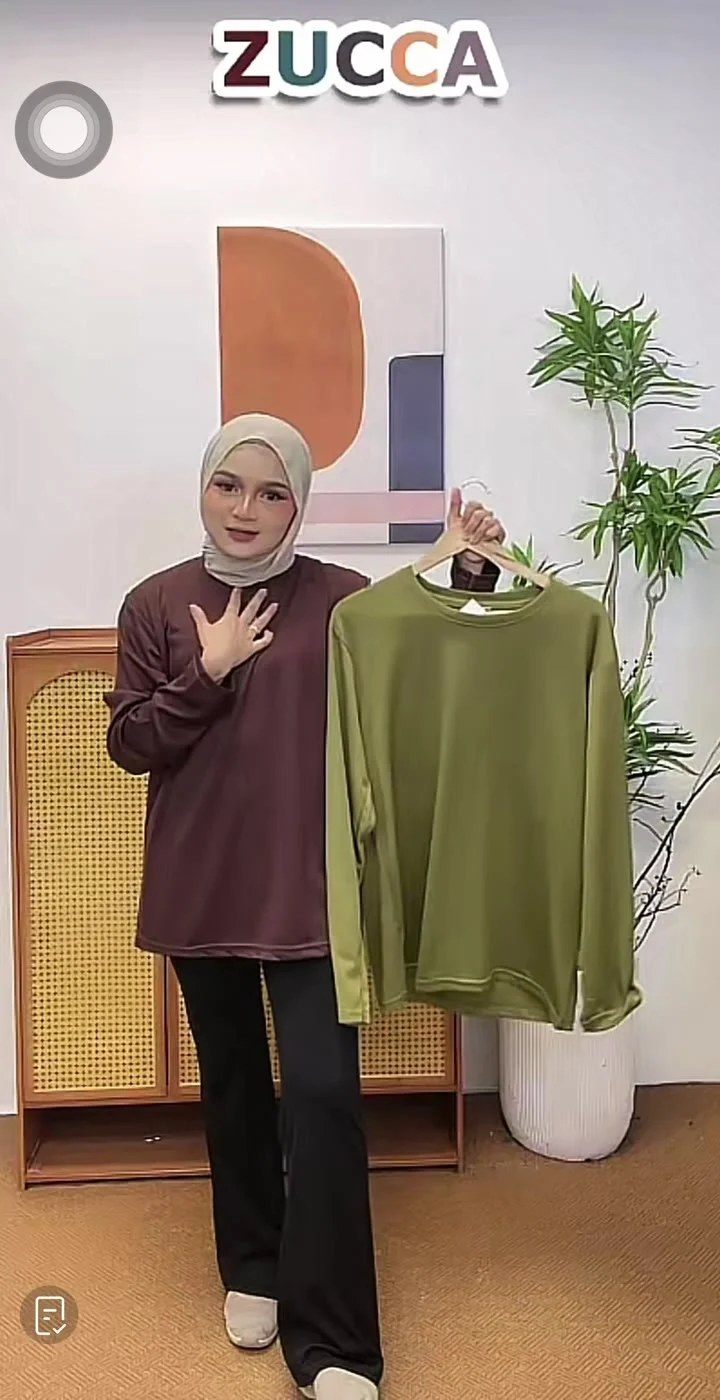
Inside the content workflow / Zucca
At Zucca, daily LIVE sessions already contain product demonstrations, fabric close-ups, shoppers’ questions and reasons to buy.
The opportunity is to turn those moments into Reels and short cuts, then test suitable versions as ads. The team starts with footage it already has.
of LIVE footage
Product demos, questions,Work through the transcript
and extracted frames.
Each cut has a different purpose.
Five hours and five candidate cuts illustrate a brief, not a measured processing time or a guaranteed yield. The source footage and the brief determine what is usable.
A fabric close-up becomes useful when the brief says which feature to show, why it matters to the buyer and what the viewer should do next. Claude Code uses that context to select moments and assemble a cut for review.
Participants learn to describe the editorial intent, then check whether the edit delivers it. A good-looking shot alone does not tell that story.
Explore the AI video-editing courseThe host’s price or value explanation, with the correct product.
Check that the offer is still valid.Fit, fabric or coverage, demonstrated by a close-up or full-garment shot.
Match the claim to what is visible.Three distinct benefits, each supported by a relevant shot.
Keep every reason accurate and useful.A natural moment that shows how the host explains the product.
Preserve context and a reason to follow.A relevant product moment with an approved call to action.
Match the CTA to the destination.Made by participants
These workshop submissions show what the students made. The notes below explain what to look for; they are not verbatim student prompts.
Student edit / 29 seconds
Watch how the product, the host’s demonstration and the promotional captions work together. Does the selected shot support the message, and is the next action clear?
Before reuse: check the current price, offer and destination. The original workshop promotion remains in this clip.
View the original student post ↗Student edit / 23 seconds
Look for three reasons to consider the product, with footage that supports each one. The editing brief gives AI a structure and a reason to choose one moment over another.
Before reuse: check that every feature claim matches the garment shown, then adapt the hook and CTA for the intended placement.
View the original student post ↗Footage and workshop examples: Zucca · Labu-Labu
Student work demonstrates content production. Ad performance still needs to be tested.
Training / Onsite or online
Bring the work you already do. Leave with something you can run again. Every programme below is one day; follow the foundation with the track that matches the role.
01 / Shop, account & brand managers
This week’s report and reorder plan, built from your own shop exports. The method is saved for next Monday.
02 / Content, social & LIVE teams
An edited short-form video, a content package and a workflow the team can reuse. Learn to direct the edit through an AI agent.
03 / Everyone: CS, finance, HR & operations
Working AI habits on your own tasks, with one recurring task automated by the end of the day.
04 / Managers & team leads using Claude Pro
Build on the foundation: team standards in a Claude Project, a live connector and an internal tool built in plain language.
Where to start
Start everyone with the same prompt method. Give it two to four weeks of real use, then run the three role-specific tracks in parallel.
Ready when each person uses AI weekly and has automated one recurring task.
Team standards in a Claude Project. One internal tool replaces a neglected spreadsheet.
The weekly report comes out the same way every Monday, whoever runs it.
LIVE replays become clips the same week, using a workflow the team can run.
A two-week audit, then implementation on the shop’s own data. A small team can stop at Stage 2.
Built from real shop work
Two AI agent workspaces for ads and supply chain operators, connected to TikTok APIs, with six production skills.
Read the operations case study ↗AI visual content at the same apparel brand, including a method for turning ideas in Bahasa Malaysia into English prompts.
Non-technical content teams learn to run the replay-to-clips workflow. Owners can also approve agent-drafted website content.
Read the website case study ↗The right starting point depends on how often the work needs to run.
Help the team make reports and content on the tools you already have, using your own exports.
Programmes & fees ↗For hero detection, product profit or API connections that need to run every day.
The two-week audit ↗Keep the system running and add capabilities as the shop’s needs change.
Discuss ongoing support ↗The work that decides profit
Start with the recurring work: a report, a stock decision, a replay nobody has time to edit. Train the team to run it consistently, then connect the parts that need to run every day.
Turn shop exports into the same report, the same way, every Monday. Save the method so a new team member can run it too.
Start with the exports you already have.
Score products for breakout signals and turn the findings into a reorder plan, instead of cross-checking dashboards by gut feel.
One production build: 10 days, 75 automated tests.
Bring fees, shipping and ads into the picture. Revenue alone cannot tell you which products are worth selling.
In one shop: shipping made up 55% of platform fees; only about 12% of LIVE ad spend was attributed in the product-level report.
Give an AI agent a product, a message and a call to action. Use the footage you already have to make cuts the team can review and test.
One observed run: five 15–30 second clips in about nine minutes, with captions and a cover.
Explore colourways and designs in content before committing to stock. Teach the team to brief, check and refine AI-generated visuals.
A way to explore ideas before the order.
Practical questions
Groove Consulting runs AI training for TikTok Shop and e-commerce teams, built from systems we have run in production for a high-volume apparel brand. Programmes cover weekly shop reports, reorder planning and AI video editing.
Start with AI for Workplace Productivity for everyone. Then split by role: Claude at Work for managers, Codex for E-Commerce Operations for shop operators, and AI video editing for the content team.
Yes. Participants bring their own exports from TikTok Shop, Shopee or Lazada. The method is the same; the field names differ, and the team learns how to check them.
No. Participants brief an AI agent in plain language. They learn to check the numbers, review the outputs and keep the method consistent.
Yes, through TikTok’s Shop and Marketing APIs as an implementation project. A training day uses Seller Center exports and needs no integration.
Yes, for eligible Malaysian employers. We confirm the exact programme and applicable conditions before you book. How the HRD Corp claim works ↗
Your shop. Your next step.
Tell us your monthly order volume, your platforms and the report your team rebuilds every week. We’ll help you choose a training day or a build, and send the outline.